
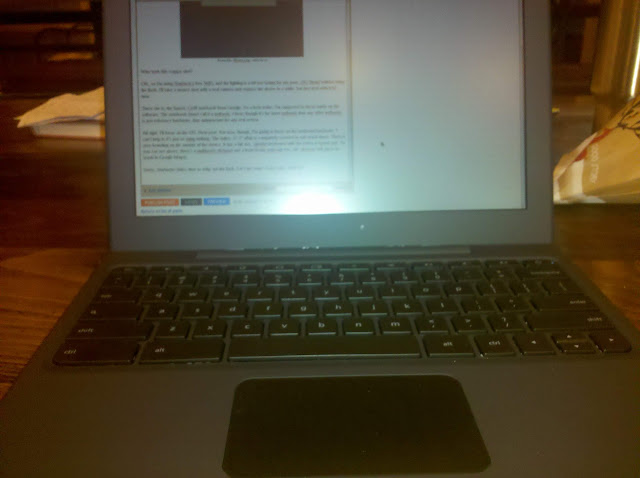
From Mr. Blurrycam, with love.
Who took this crappy shot?
OK, so I'm using Starbuck's free WiFi, and the lighting is a bit too taxing for my poor, OG Droid without using the flash. I'll take a money shot with a real camera and replace the above in a while, but just deal with it for now.
There she is; the famed, Cr48 notebook from Google. As a beta tester, I'm supposed to focus solely on the software. The notebook (don't call it a netbook, I hear; though it's far more netbook than any other netbook) is just reference hardware, thus unimportant for any real review.
All right, Google; I'll focus on the OS.
Next post. For now, though, I'm going to focus on the irrelevant hardware. I can't help it; it's just so striking. If they wanted me to ignore the hardware, they ought to have shoved Chrome OS into a Eee PC. Glossy, small screen, generic; easy to ignore. Not this.
For starters, the entire, 12.1" affair is completely covered in soft touch black. Owners of an OG Droid know what I'm talking about, here. It screams quality functionality with no gimmicks. Speaking of no gimmicks, there is zero branding on the outside of the device. No "with Google," no giant, lit up logo on the lid to advertise to other coffee aficionados; the lid is simply the top of the unit. Once you flip said lid, you're greeted by a full size, chicklet keyboard (with all the letters in lowercase) and a multitouch clickpad which, thankfully, will pinch-to-zoom in Google Maps. The 16:9, 1280x800 screen is matte (no glare-inducing, studio gloss here) and topped by a webcam and light sensor.
Sorry, Starbucks folks; time to whip out the flash. Let's get some clearer pics, shall we?

Rear

Side (Ports are USB, 3.5mm headphone, and power.)

Closed
Full Montey
They're still not stellar shots, I know, but the Droid's flash is a fairly weak, LED setup. I would do some nicer shots with my Sony, but the Cr48 doesn't yet read from external media (edit: it can, but it's a bit cumbersome; I'll explain in my next post on the OS itself).
As you can see, it's a very plain device. I'm afraid the above shots, though, don't nearly do it justice. In person, it really is a very classy, handsome machine. The understated, fingerprint resistant (though by no means immune), soft touch surface coupled with the matte screen and the lack of any branding whatsoever just feels so, well, grown up. I think I will get some better shots with my Sony; you really have to see this thing to appreciate it. Compared to the aforementioned Eee PC netbook, the ASUS looks like a Toys R Us mock up for kids to play at working on a computer; just like Daddy!

See what I mean?
The Cr48 is your daddy, Eee.
Google is very close with the exact specs, because the hardware isn't really supposed to matter. Well, it does, so here are some specifics I got off of the ol' intertubes:
Processor: Intel Atom Processor N455 1.66GHz 512K Cache
Chipset: Intel CG82NM10 PCH
Motherboard: Tripod Motherboard MARIO – 6050A240910 – MB – A03
Ram: Hynix 2GB DDR3 1Rx8 PC3 – 10600S Ram
Read Only Memory: ITE IT8500E Flash ROM
SSD Drive: SanDisk sdsa4dh-016G 16GB SATA SSD
Wireless Wan: Qualcomm Gobi2000 PCI Express Mini Card
3G Adapter: AzureWave 802.11 a/b/g/n PCI-E Half MiniCard
Bluetooth: Atheros AR5BBU12 Bluetooth V2.1 EDR
So, we're looking at a 1.66GHz, 2GB RAM, 16GB SSD netbook with a 12.1" screen, webcam, b/g/n WiFi, Bluetooth 2.1, and a 3G modem (CDMA, Verizon only, I believe). There's also an SDHC expansion slot, but it's not readable by Chrome OS, yet (planned for a future update). Not too shabby. This would be about a $300-400 netbook, if sold commercially.
As this is reference hardware, I really hope companies refer to it when designing their own Chrome OS netbooks. Samsung and Acer ought to have some out later this year, followed by the rest of the gang of usual suspects. I really do hope they stick with the form factor of the Cr48. 12.1" is so much nicer than 10.1" (I won't even mention 7"; come on, it's not a tablet), and the businesslike nature of the zero branding, soft touch dressing, and matte screen are a welcome change in today's ad-blitz, colour craze, gloss screen and plastic world.
We'll light on the OS in due course, but for now I'll say this: the Cr48 hardware is almost perfect. Add in another USB port and an HDMI output and you can kick out the "almost."
Motherboard: Tripod Motherboard MARIO – 6050A240910 – MB – A03
Ram: Hynix 2GB DDR3 1Rx8 PC3 – 10600S Ram
Read Only Memory: ITE IT8500E Flash ROM
SSD Drive: SanDisk sdsa4dh-016G 16GB SATA SSD
Wireless Wan: Qualcomm Gobi2000 PCI Express Mini Card
3G Adapter: AzureWave 802.11 a/b/g/n PCI-E Half MiniCard
Bluetooth: Atheros AR5BBU12 Bluetooth V2.1 EDR
So, we're looking at a 1.66GHz, 2GB RAM, 16GB SSD netbook with a 12.1" screen, webcam, b/g/n WiFi, Bluetooth 2.1, and a 3G modem (CDMA, Verizon only, I believe). There's also an SDHC expansion slot, but it's not readable by Chrome OS, yet (planned for a future update). Not too shabby. This would be about a $300-400 netbook, if sold commercially.
As this is reference hardware, I really hope companies refer to it when designing their own Chrome OS netbooks. Samsung and Acer ought to have some out later this year, followed by the rest of the gang of usual suspects. I really do hope they stick with the form factor of the Cr48. 12.1" is so much nicer than 10.1" (I won't even mention 7"; come on, it's not a tablet), and the businesslike nature of the zero branding, soft touch dressing, and matte screen are a welcome change in today's ad-blitz, colour craze, gloss screen and plastic world.
We'll light on the OS in due course, but for now I'll say this: the Cr48 hardware is almost perfect. Add in another USB port and an HDMI output and you can kick out the "almost."


